HrdHat makes filling daily risk assessments simple, easy and interesting.
Do you struggle to get Field Level Risk Assessments filled out? And when they do come back, are they any good?
You know how it goes. 7:02 a.m., dull pencil, tailgate. "Slips, trips, falls. PPE." Signed. Same as yesterday, same as last week. Nobody reads it and nobody believes it.
Your crew isn't lazy. The form is a pain. When something is a pain, people do the bare minimum. Putting that same blank form on a phone doesn't change anything. A blank form on a screen is still a blank form.
Why I built HrdHat
I'm a tradesman. I didn't set out to build another safety platform for the office. I set out to build a form filler that's good-looking and simple enough that a worker actually wants to open it, because engagement with every FLRA I've ever handed out sucked.
Here's what that looks like on your phone, start to finish.
Step 1: Open today's FLRA
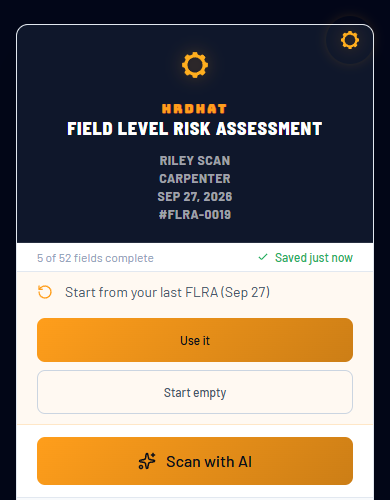
Two ways to start. Use it copies your last FLRA, so you only change what changed. Scan with AI drafts a fresh one from photos. You can do both.
Step 2: Read the ground rules once
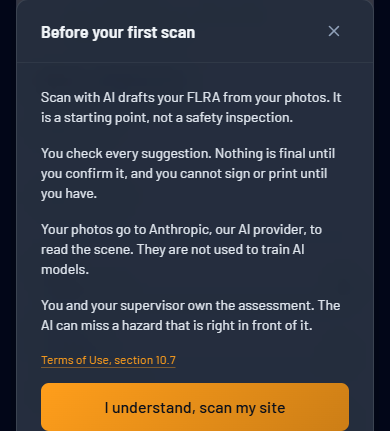
The first time you scan, HrdHat tells you exactly what the AI is and isn't. It's a starting point, not a safety inspection. You check every suggestion. You can't sign or print until you have. You and your supervisor own the assessment. No fine print. It's right there before your first scan.
Step 3: Take a photo and say what you're doing
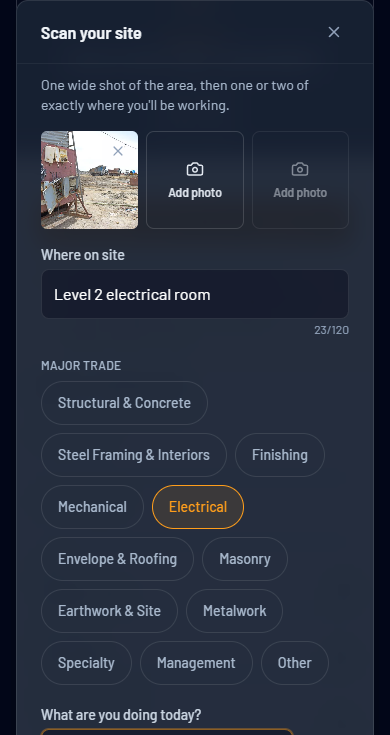
One wide shot of the area, one or two of exactly where you'll work. Tap your trade, type or say where you are and what you're doing today. That's it.
Step 4: Answer what the photo can't show
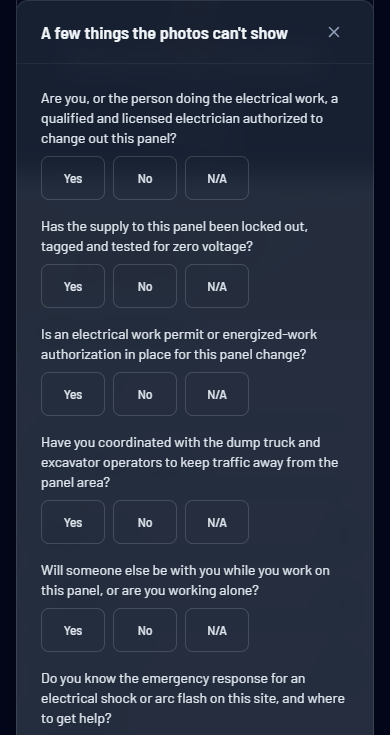
A photo can't show whether the panel is locked out or whether you're working alone. So HrdHat doesn't guess. It asks. These questions are specific to your job. For a panel change-out that means lockout, permits, who's qualified, and the dump truck backing up next to you.
Step 5: Review what the AI wrote
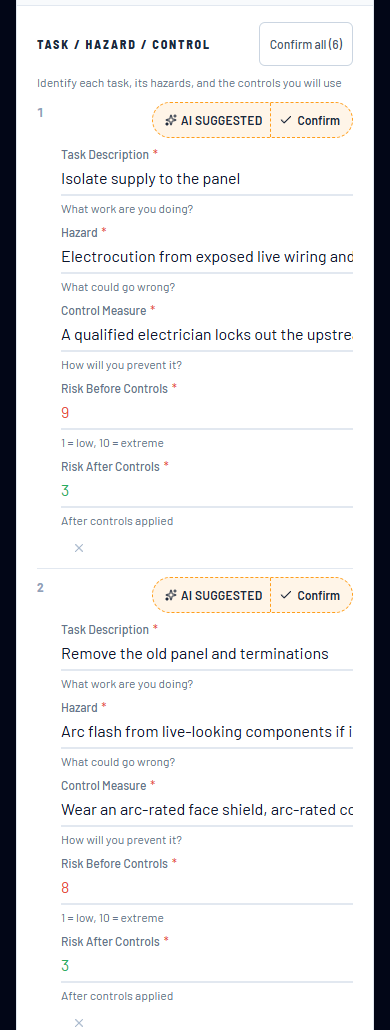
Tasks, hazards, controls and risk ratings, written for today's job: "Electrocution from exposed live wiring," not "electrical hazards." Every AI-written row is marked AI SUGGESTED in gold. You confirm it, change it, or delete it. Nothing counts until you do.
Step 6: It remembers your job and asks what's changed
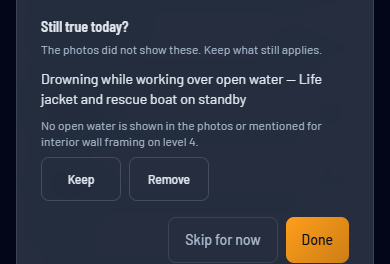
HrdHat learns from you. Every FLRA you complete becomes part of your own history. The next time you scan on the same project, or doing the same kind of work, it builds from the hazards and controls you confirmed before. It doesn't start from scratch every morning.
When yesterday's hazard doesn't show up in today's photos, it doesn't quietly drop it and it doesn't quietly keep it. It asks you: Still true today? Keep or remove. Your call.
Step 7: High-risk work gets a second set of eyes
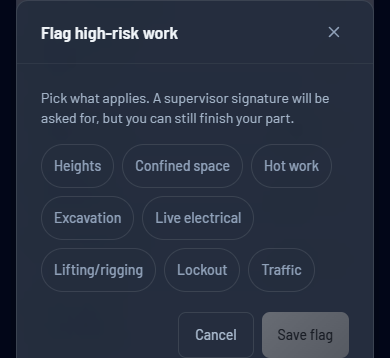
Heights, confined space, hot work, excavation, live electrical, lifting, lockout, traffic. If the AI spots high-risk work it proposes the flag, and you can flag it yourself too. A flagged FLRA asks for a supervisor signature.
Step 8: You can't sign until you've checked it
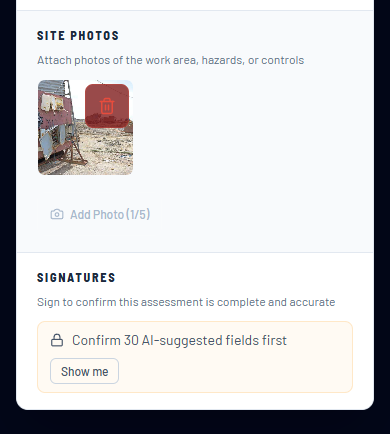
This is the one that matters. The signature is locked until every AI suggestion is confirmed. So is printing and exporting. Tap Show me and it walks you to what's left. No worker can sign off on something they never looked at.
Step 9: Done and on file
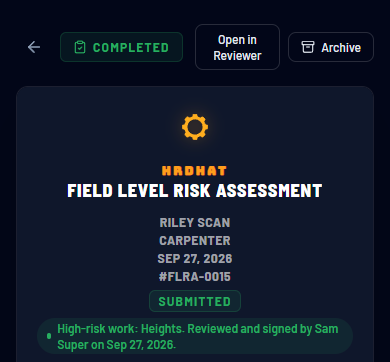
Completed, submitted, and the high-risk work reviewed and signed by the supervisor. It's saved in your account and ready to send as a PDF.
The guardrails, in one place
If you're a super or a safety manager, this is the part you care about:
- Every AI-written answer is marked. Nothing the AI writes looks like the worker wrote it.
- The worker confirms every one. One at a time, or "Confirm all" after reading.
- No signature, no print, no export until every AI suggestion is confirmed.
- The AI asks instead of guessing on anything a photo can't prove: lockout, permits, qualifications, working alone.
- Old hazards aren't silently dropped. "Still true today?" makes the worker decide.
- High-risk work asks for a supervisor signature.
- Up-front honesty. Before the first scan, every worker is told the AI can miss a hazard that's right in front of it, and that they own the assessment.
- Your photos aren't used to train AI models. Sharing your confirmed hazard rows to improve scans for everyone is a separate switch, and it's off unless you turn it on.
How HrdHat stacks up
I've used the big names. They're good at what they're built for, which is the office: storing forms, tracking them, reporting on them. None of them is built around the moment that actually decides whether your FLRA is any good, a worker standing on site with a phone. Here's how they compare, going by what each one publishes on its own site:
- Fills your FLRA from a photo of the jobsite. HrdHat: yes. Procore, Fieldwire, SiteDocs: no.
- Starts from your last FLRA. HrdHat: yes, and it asks what's still true today. Fieldwire: duplicate a form. SiteDocs: scheduled, pre-filled forms. Procore: no.
- Marks every AI answer and locks the signature until the worker confirms it. HrdHat: yes. Procore, Fieldwire, SiteDocs: no.
- Learns from your own past FLRAs. HrdHat: yes. Procore, Fieldwire, SiteDocs: no.
- What one worker pays. HrdHat: $0 to start, Foreman $9 a month. Procore: an annual contract priced on construction volume. Fieldwire: custom forms start at $64 per user per month. SiteDocs: quote only.
- Built for. HrdHat: the worker filling out the form. The others: the office, the project team, the safety program.
To be fair, Procore did launch an AI agent this summer that spots hazards in site photos. It sits in their paid AI package, and nothing they've published puts it inside the worker's FLRA. HrdHat puts that power in the worker's hand, inside the FLRA, and the worker signs off on every line.
Give it a try
Sign up with a $0 Tradesman account at hrdhat.site and scan your next job. If it saves your crew time, Foreman gets you 40 scans a month.
I built HrdHat because I was sick of fighting with forms. If your FLRAs are getting pencil-whipped, give HrdHat one morning. It'll help.