Drawings
View your plans on site, mark them up, and measure off the sheet without a scale rule.
Upload the PDF set once and every sheet is on your phone. Pinch in on a detail, flip pages, cloud what changed, drop a note where the super will look. Tap two ends of a known dimension to set the scale, then measure anything. What you draw is saved on the sheet, so it is still there next week.
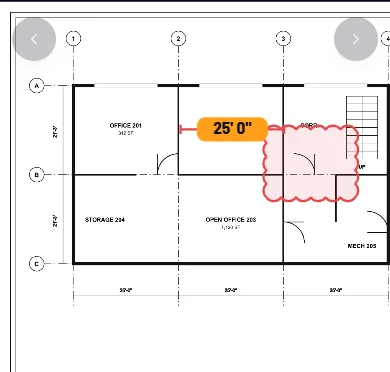

The set, one sheet per page. 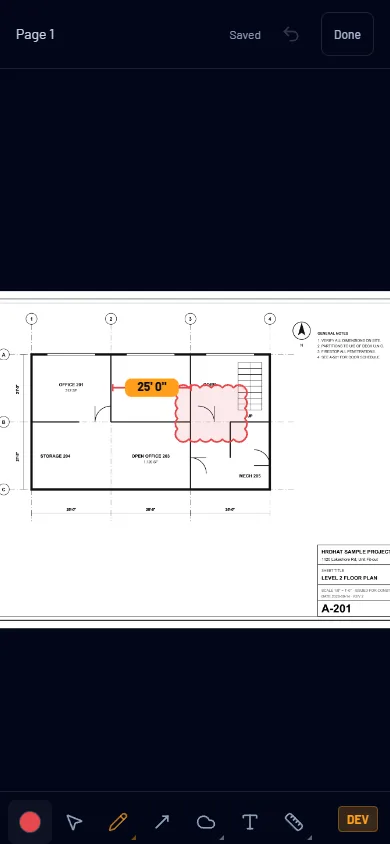
Pen, arrows, clouds, shapes, notes, measure. One bar, gloves on.
Start with this at $0
Viewing is on Tradesman. Markup and measure are on Foreman.
$0 and Foreman
| Drawings | Tradesman $0 | Foreman $5/mo |
|---|---|---|
| File storage | 50 MB | 2 GB |
| Upload site documents; the Forms, Timesheets, Reviewed and Sent Forms folders fill themselves | Yes | Yes |
| Drawings: upload your plans and open them on site | Within your storage | Yes |
| Mark up your drawings: pen, highlighter, arrows, clouds, shapes, notes and measurements, saved on the sheet | — | Yes |
Same rows as the pricing table. Every row is a gate that exists in the product.
How it fits the rest
Files
Drawings live in your Files beside the Forms, Timesheets and Photos folders. Upload from the phone or the desktop; open from either.
Log book
Cloud the change on the sheet, then log it under the day with a photo.